Ultimate Guide to Power Supply for Electronics Repair & Projects
Table of Contents
- 1. Introduction: Why Power Supply Knowledge Matters
- 2. Quick Electricity Basics for Power Supply Understanding
- 3. What Is a Power Supply in Electronics?
- 4. Key Power Supply Specifications You Must Know
- 5. Common Types of Power Supply Used by Technicians
- 6. Inside an SMPS: Main Blocks and Working Concept
- 7. Power Supply Safety: Isolation, Earthing and Best Practices
- 8. How to Choose the Right Power Supply for Your Project
- 9. Testing and Troubleshooting Power Supplies
- 10. Maintenance Tips, Common Mistakes and Best Practices
- 11. Frequently Asked Questions About Power Supplies
1. Introduction: Why Power Supply Knowledge Matters
In every electronic device – from a small mobile phone charger to a large LED TV or industrial controller – there is one hidden hero that keeps everything alive: the power supply. Without a stable and safe power supply, even the most advanced microcontroller or high-end processor is completely useless. If you want to become a powerful electronics technician or repair engineer, understanding power supply basics is absolutely non-negotiable.
On TamilTechnicians.com, many of our tutorials, repair guides and project circuits start with one common step: “Check the power supply.” Most real-world faults in electronics, especially in TVs, monitors, set-top boxes, DVD players, SMPS adapters and amplifiers, are directly related to power supply problems. A blown fuse, a shorted rectifier, a bulged capacitor or a dead SMPS controller IC can completely shut down the device.
This detailed article is written in simple English, but with a technician-focused angle. Whether you are a beginner electronics student, a DIY hobbyist starting a small lab at home, or a professional running an electronics repair shop, this complete guide to power supply will help you understand:
- What a power supply actually does inside a device.
- Essential terms like voltage, current, watt, efficiency, regulation and ripple.
- Different types of power supplies – linear, SMPS, regulated, unregulated, bench supplies and more.
- How to work safely with mains voltage and high-voltage capacitors.
- Simple methods to test, troubleshoot and select the right power supply for your project or repair work.
Keep this guide bookmarked on Tamil Technicians – whenever you handle a new gadget or design a new project, you can come back here to refresh your power supply concepts.
2. Quick Electricity Basics for Power Supply Understanding
Before we jump deep into power supplies, let us revise a few basic electrical terms. You might have already studied these in school or at ITI / diploma level, but we will connect them specifically to power supply behavior.
2.1 Voltage (V)
Voltage is the electric potential difference between two points. You can imagine it like pressure that pushes electrons through a wire. In India, the AC mains voltage is typically 230 V AC. Most electronic circuits, however, work at low DC voltages such as 12 V, 9 V, 5 V, 3.3 V or even lower.
A power supply’s job is usually to convert high voltage AC (like 230 V) or some battery voltage into the correct DC voltage required by the circuit.
2.2 Current (I)
Current is the flow of electrons through a conductor, measured in amperes (A). In power supply ratings, you will often see “5 V 2 A” or “12 V 5 A”. Here, 2 A or 5 A is the maximum current that the power supply can safely deliver without overheating or shutting down.
2.3 Power (W)
Power is the rate at which energy is consumed or supplied, measured in watts (W). The relationship is:
Power (P) = Voltage (V) × Current (I)
If a power supply outputs 12 V at 3 A, the maximum power capability is 36 W. This is important when you choose a power supply for a load like a LED strip, amplifier or motor.
2.4 AC vs DC
AC (Alternating Current) changes direction periodically, while DC (Direct Current) flows in one direction. Most mains supply is AC, but digital circuits, microcontrollers and logic ICs need stable DC. So, a typical power supply includes a stage to convert AC to DC (rectification), smooth it and regulate it.
3. What Is a Power Supply in Electronics?
In simple words, a power supply is an electronic circuit or device that:
- Receives power from a source (AC mains, battery, solar panel, USB port etc.)
- Converts, conditions and controls that power
- Provides the correct voltage and current to the load safely and reliably
In most electronics repair cases, the power supply is built into the product. For example, a TV or SMPS-based DVD player has an internal power supply board. In other cases, the power supply is external, such as a laptop charger, mobile adapter or LED strip adapter.
3.1 Typical Stages of a Power Supply
A generic power supply consists of several functional blocks:
- Input stage: Fuse, surge protection, EMI filter.
- Transformation / conversion: Transformer or switching converter to change voltage level.
- Rectification: Converting AC to DC using diodes or bridge rectifiers.
- Filtering: Smoothing the DC with capacitors and sometimes inductors.
- Regulation: Keeping the output voltage stable even if load or input changes.
- Protection: Over-current, short-circuit, over-voltage, over-temperature protection circuits.
The exact design and components change between linear power supplies and SMPS (Switched-Mode Power Supplies), but the basic job is the same: deliver clean, stable and safe DC power.
4. Key Power Supply Specifications You Must Know
When you read a power supply label or datasheet, you will see many technical terms. Understanding them will help you choose the right unit and also judge whether a power supply is healthy during repair.
4.1 Output Voltage
This is the nominal DC voltage, such as 5 V, 9 V, 12 V, 24 V etc. Many modern digital devices use multiple voltage rails like 12 V, 5 V, 3.3 V and 1.2 V in the same SMPS. A good power supply should keep the output voltage close to the rated value, within a tolerance (for example ±5%).
4.2 Output Current
Output current rating tells you the maximum load current that the power supply can deliver safely. For example, a 5 V 1 A adapter can theoretically supply up to 1 A. Your load can draw less current; the power supply will only supply what the load demands, up to its limit.
A common mistake is using a power supply with too low current rating; this can cause voltage drop, overheating and random device resets. It is perfectly safe to use an adapter with higher current rating (e.g., using a 5 V 3 A adapter for a 5 V 1 A load) as long as the voltage matches.
4.3 Regulation
Regulation defines how well the power supply maintains its output voltage under different conditions.
- Line regulation: Output stability when input voltage changes.
- Load regulation: Output stability when load current changes from light to heavy.
Good regulation is crucial for microcontrollers, logic circuits and sensitive analog circuits like audio preamps.
4.4 Ripple and Noise
Ripple is the small AC component that remains on the DC output after filtering, usually at the switching frequency or mains frequency. Excessive ripple can cause hum in audio amplifiers, unstable behavior in microcontrollers or flicker in LED lighting. In SMPS, bad electrolytic capacitors or poor design often increase ripple.
4.5 Efficiency
Efficiency is the ratio of output power to input power, expressed in percentage. Linear supplies typically have lower efficiency (50–60%), while SMPS can reach 80–90% or more. Higher efficiency means less heat, smaller components and lower electricity bills.
4.6 Protection Features
Modern power supplies often include:
- Over-current protection (OCP) – prevents damage when load draws too much current.
- Short-circuit protection (SCP) – shuts down or limits output during short circuit.
- Over-voltage protection (OVP) – protects load from excessive voltage.
- Over-temperature protection (OTP) – turns off supply if it overheats.
As a repair technician, knowing these features helps you understand why some power supplies enter “protection mode” and do not start if a load is shorted.
5. Common Types of Power Supply Used by Technicians
In the field of electronics repair and DIY projects, you will regularly encounter several types of power supplies. Each has its own advantages and typical applications.
5.1 Unregulated Linear Power Supply
This is the simplest form of power supply:
- Step-down transformer reduces 230 V AC to a lower AC voltage.
- Bridge rectifier converts AC to pulsating DC.
- Filter capacitor smooths the output.
There is no active regulation, so the output voltage changes with load current and input variations. These are fine for simple loads like bulbs, relays or motors but not ideal for sensitive electronics.
5.2 Regulated Linear Power Supply
Here, after rectification and filtering, a linear regulator IC like 7805, 7812, LM317 or modern LDO is used to stabilize the output voltage. Linear regulated power supplies are:
- Low noise and low ripple – very clean DC.
- Simple to design and repair.
- But heavier and less efficient due to large transformers and heat dissipation.
Many bench power supplies and older audio equipment use this method. In the Tamil Technicians lab, we still use a few linear bench supplies when testing audio circuits and RF modules because of their low noise.
5.3 Switched-Mode Power Supply (SMPS)
SMPS is the most common type in modern electronics: TV SMPS boards, computer SMPS, mobile chargers, LED drivers etc. Instead of using a heavy 50 Hz transformer, SMPS converts AC to DC and then uses high-frequency switching and a smaller transformer.
Advantages:
- High efficiency (70–90% or more).
- Compact size and lightweight.
- Can generate multiple voltage outputs from one supply.
Disadvantages:
- More complex circuit, harder for beginners to repair.
- Higher EMI and switching noise if not properly designed.
5.4 Bench / Laboratory DC Power Supply
A bench power supply is an adjustable DC power source commonly used in labs, training institutes and repair centers. Key features:
- Adjustable output voltage (for example 0–30 V).
- Adjustable current limiting – extremely useful to avoid damaging circuits.
- Often multiple outputs like dual ±15 V for op-amp circuits.
- Digital display for voltage and current.
If you are serious about electronics as a career, investing in a good bench power supply will make your testing and troubleshooting much easier.
5.5 ATX Power Supply (Computer SMPS)
ATX supplies are SMPS units designed for desktop computers, providing multiple rails like +3.3 V, +5 V, +12 V and sometimes −12 V. Many hobbyists convert old ATX SMPS units into lab power supplies for projects.
5.6 Battery Chargers and Power Adapters
Mobile chargers, laptop adapters and many other external adapters are basically small SMPS units with fixed output voltage. When repairing these, the primary side connects to mains and the secondary side provides isolated low voltage.
5.7 UPS and Inverters (Briefly)
Although they are not “power supplies” in the usual small electronics sense, UPS and inverters also perform power conversion: converting DC from a battery to AC and managing charging. Their internal power supply sections often include SMPS circuits for battery charging and control electronics.
6. Inside an SMPS: Main Blocks and Working Concept
Understanding the core idea of SMPS will deeply help you during TV SMPS repair, monitor repair or adapter repair. While exact designs differ, most flyback SMPS used in chargers and small devices share common blocks.
6.1 Basic Working Principle
Instead of dropping voltage at 50 Hz like a linear transformer, SMPS:
- Rectifies AC mains to high-voltage DC (around 310–320 V for 230 V AC).
- Switches this DC at high frequency (20–100 kHz or more) using a transistor or MOSFET.
- Transfers energy through a small ferrite transformer.
- Rectifies and filters the secondary to produce low-voltage DC.
- Uses feedback (usually an optocoupler and reference IC) to regulate the output voltage.
By working at high frequency, SMPS can use smaller transformers and achieve high efficiency.
6.2 Common SMPS Stages for Technicians
- Input filter and fuse: Protect against surges and filter EMI.
- Bridge rectifier and bulk capacitor: Create high-voltage DC bus.
- Switching transistor / MOSFET and driver IC: Chop DC at high frequency.
- Flyback or forward transformer: Provides isolation and steps voltage up or down.
- Secondary rectifiers and output capacitors: Provide DC to load.
- Feedback loop: Senses output and controls the duty cycle via optocoupler.
During repair, typical SMPS faults include:
- Blown fuse due to shorted MOSFET or bridge rectifier.
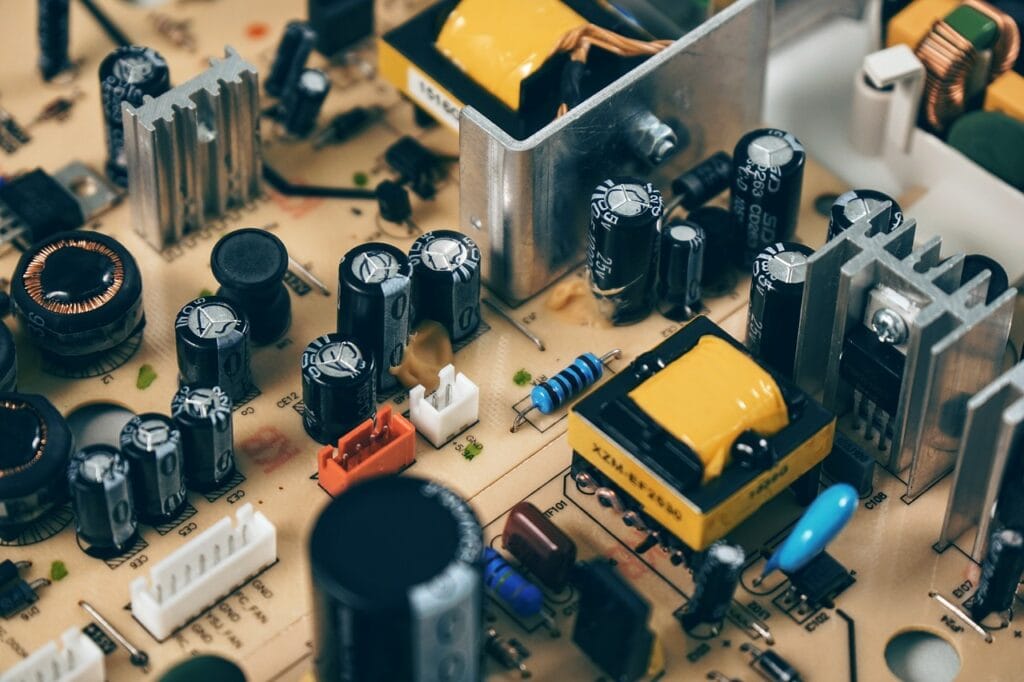
- Bulged electrolytic capacitors causing ripple, random restart or no power.
- Faulty optocoupler or reference IC (like TL431) disturbing regulation.
- Dry solder joints on transformer pins and high-power resistors.
7. Power Supply Safety: Isolation, Earthing and Best Practices
Working with power supplies, especially mains-powered SMPS and linear supplies, can be dangerous if you ignore basic safety rules. As Tamil Technicians, we strongly recommend following these guidelines every time you handle a power supply.
7.1 Isolation from Mains
Many test instruments like oscilloscopes assume their ground is at earth potential. Directly connecting such instruments to the primary side of SMPS without isolation can cause shocks and damage equipment. Use an isolation transformer when investigating mains-referenced circuits.
7.2 Earthing and Enclosures
Metal-bodied power supplies and devices must have proper earthing. A broken earth wire, loose earth connection or incorrect plug can make the entire chassis live. During repair, always verify continuity of earth paths and ensure enclosures are fitted back correctly.
7.3 Discharging Capacitors
Large electrolytic capacitors in SMPS and linear supplies can hold a charge even after switching off. This can give a nasty shock or damage sensitive components when you touch the board. Always:
- Unplug the device from mains.
- Wait for some time and then safely discharge capacitors using a high-value resistor (e.g., 100 kΩ 2 W) – never short them directly with a screwdriver.
- Verify with a multimeter that voltages have dropped to a safe level.
7.4 Proper Tools and Insulation
Use insulated screwdrivers, probes and test leads rated for mains voltage. Wear proper footwear and avoid working with wet hands or on metal surfaces. If you are a beginner, do not attempt live mains troubleshooting alone; work under supervision until you gain confidence and proper safety habits.
7.5 Respecting Polarities and Connectors
Reversing polarity on DC connectors is another common cause of damage. Many devices use center-positive barrel jacks, but some use center-negative. Always double-check the polarity symbol printed on the device and the power supply before connecting.
8. How to Choose the Right Power Supply for Your Project
Whether you are building an Arduino project, repairing a router or powering an LED strip, selecting the right power supply is crucial for reliability and safety.
8.1 Step 1 – Determine Required Voltage
Check the device label, datasheet or manual for voltage requirements. Microcontroller boards may need 5 V or 3.3 V, amplifiers may need 12–24 V and LED strips often need 5 V or 12 V. Using the wrong voltage can permanently damage your load.
8.2 Step 2 – Calculate Required Current
Add up the current consumption of all modules or components in your project. For example, if an MCU board needs 300 mA, a sensor needs 100 mA and some LEDs draw 400 mA, total is 800 mA. Add a safety margin of at least 30–50%, so choose a power supply capable of 1.2 A or more.
8.3 Step 3 – Check Regulation and Ripple Requirements
For digital and communication circuits, choose a regulated DC power supply with low ripple. If you supply raw unregulated DC, the voltage might rise too high at light load and damage ICs. For motors or simple lamps, unregulated supplies may still be acceptable.
8.4 Step 4 – Select Connector Type and Polarity
Confirm the connector type (barrel jack size, USB type, screw terminals, etc.) and polarity. For custom projects, using screw terminals or clearly marked connectors reduces mistakes.
8.5 Step 5 – Consider Efficiency and Heat
For continuous operation or high-power loads, a high-efficiency SMPS will save energy and reduce heat. Never fully load a power supply at its maximum rating continuously; use a supply that can comfortably handle more than the maximum required current.
8.6 Step 6 – Brand, Safety and Certifications
Cheap, no-name adapters may not have proper isolation or protection. For critical applications, invest in power supplies from trusted manufacturers with safety markings like CE, UL or BIS. This is especially important in electronics repair business where your reputation depends on long-term reliability and safety.
9. Testing and Troubleshooting Power Supplies
As a technician, you will often need to decide if a power supply is healthy or faulty. Here are practical steps to test and troubleshoot a typical DC power supply.
9.1 Basic Tools Required
- Digital Multimeter (DMM) with DC/AC voltage, resistance and continuity ranges.
- Sometimes an analog meter (useful to see fluctuations).
- Dummy load – power resistors, old bulbs or electronic load.
- Insulation and basic hand tools.
9.2 Simple Output Test
- Without load, measure output voltage at the terminals.
- Compare with rated voltage – is it within ±5%?
- If the voltage is too low, too high or fluctuating, suspect a problem.
However, some SMPS may not start properly without load, so a small dummy load like a 10 W resistor or bulb may be needed.
9.3 Load Test
Connect a suitable load and monitor:
- Does the voltage remain stable under load?
- Does the power supply overheat or shut down?
- Do you hear abnormal buzzing or see flickering LEDs?
A power supply that works fine without load but fails under load often has weak capacitors or damaged switching components.
9.4 Visual Inspection
Many power supply faults can be observed visually:
- Bulged or leaking electrolytic capacitors.
- Burnt resistors or ICs, blackened areas.
- Cracked solder joints, especially on power components and transformers.
- Broken connectors or loose wires.
9.5 Common Fault Patterns in SMPS
Experienced technicians often see repeated patterns:
- No power, fuse blown: Often due to shorted MOSFET or bridge rectifier.
- Power cycling on and off: SMPS tries to start, detects fault, enters protection; may be due to short on secondary or bad feedback components.
- Low output voltage: Weak optocoupler, bad reference IC, dried capacitors or partial short.
- High output voltage: Feedback not working correctly; dangerous for load.
9.6 When Not to Repair
For very low-cost adapters or chargers, replacing the unit may be safer and more economical than repairing, especially if the design itself is poor. As Tamil Technicians, we encourage technicians to balance customer safety, time and cost.
10. Maintenance Tips, Common Mistakes and Best Practices
Power supplies may run for many hours every day inside devices. Proper maintenance and good design practices greatly extend their life.
10.1 Keep Ventilation Clear
Many SMPS units rely on airflow for cooling. Dust and dirt can block vents and fans, causing overheating and premature failure of capacitors and semiconductors. Encourage users to keep devices in ventilated places and clean dust regularly.
10.2 Use Correct Rating Fuses
Never “bypass” fuses or replace them with higher rating ones. Fuses are last-line protection that can prevent fire and serious damage. Always use the correct type (fast-blow, slow-blow) and rating as per design.
10.3 Avoid Overloading
Just because a power supply can deliver 5 A does not mean you should pull 5 A continuously in a hot environment. Overloading accelerates aging. Design projects with margin and educate customers not to connect extra loads beyond the original design.
10.4 Choose Quality Capacitors
In SMPS, the most common failures are due to poor-quality electrolytic capacitors. When repairing, use branded capacitors with appropriate temperature rating (105 °C) and low ESR where needed.
10.5 Label Outputs Clearly in Your Projects
In your own DIY or professional projects, always label voltage rails, polarity and maximum current near connectors. This avoids future confusion and protects your circuits when someone else uses your design.
10.6 Building a Simple Power Supply as a Learning Exercise
For beginners learning from Tamil Technicians, a great mini-project is:
- A small transformer-based 12 V DC unregulated supply.
- Followed by a 7805 regulator to get 5 V regulated output.
- Add input and output capacitors as per datasheet.
- Test with an LED load, then with a small microcontroller board.
This simple project will cement your understanding of rectification, filtering, regulation and heat dissipation, before you move on to advanced SMPS repair.
11. Frequently Asked Questions About Power Supplies
Q1. What is a power supply in electronics?
A power supply is a device or circuit that converts electrical energy from a source (AC mains, battery, solar, USB, etc.) into a stable DC voltage and current required by electronic circuits. It often provides isolation, regulation and protection.
Q2. What is the difference between linear power supply and SMPS?
A linear power supply uses a mains-frequency transformer and linear regulator. It is simple, has low noise but is bulky and less efficient. A Switched-Mode Power Supply (SMPS) uses high-frequency switching, transformers and control ICs, offering higher efficiency and compact size but has more EMI and is more complex to design and repair.
Q3. Can I use a power supply with higher current rating?
Yes, it is safe to use a power supply with higher current capability as long as the voltage and polarity match. The load will only draw the current it needs; the extra current rating is just a margin.
Q4. Why does my SMPS keep turning on and off repeatedly?
This is often due to the SMPS entering protection mode. There may be a short circuit on the load side, faulty feedback components or damaged capacitors. Disconnect the load and test the supply with a dummy load; if the issue remains, the SMPS itself needs repair.
Q5. Is it safe for beginners to repair power supplies?
Beginners should start with low-voltage, battery-powered circuits and simple linear supplies. Mains-powered SMPS and high-voltage sections should only be handled after proper training and with strict safety measures, including isolation transformer and insulated tools.
If you want more articles like this on power supply repair, SMPS troubleshooting and practical projects, keep checking TamilTechnicians.com. We will be adding step-by-step guides, circuit diagrams and video tutorials tailored for Indian technicians and students.