
Java Program Structure (Class, main, Methods)
– Full Beginner Explanation
Java program starts from main(). But many beginners don’t know why it’s written like public static void main(String[] args), what a class is, and how methods work. In this lesson, we’ll build a strong foundation: class structure, main method, writing your own methods, calling methods, parameters, return values, and common mistakes.
Table of Contents
Jump1) Overview: What is inside a Java Program?
Big pictureA Java program is usually written in a file ending with .java. Inside that file, we commonly have:
- Class (mandatory – Java code lives inside classes)
- main method (mandatory for a runnable program – entry point)
- Other methods (optional – for reusable tasks)
public class MyProgram {

    public static void main(String[] args) {
        // Program starts here
    }

    // Your own methods here
}The biggest difference between Java and some other languages is that Java is very structured. Java forces you to put code inside classes so that large applications can be organized well.
2) What is a Class in Java?
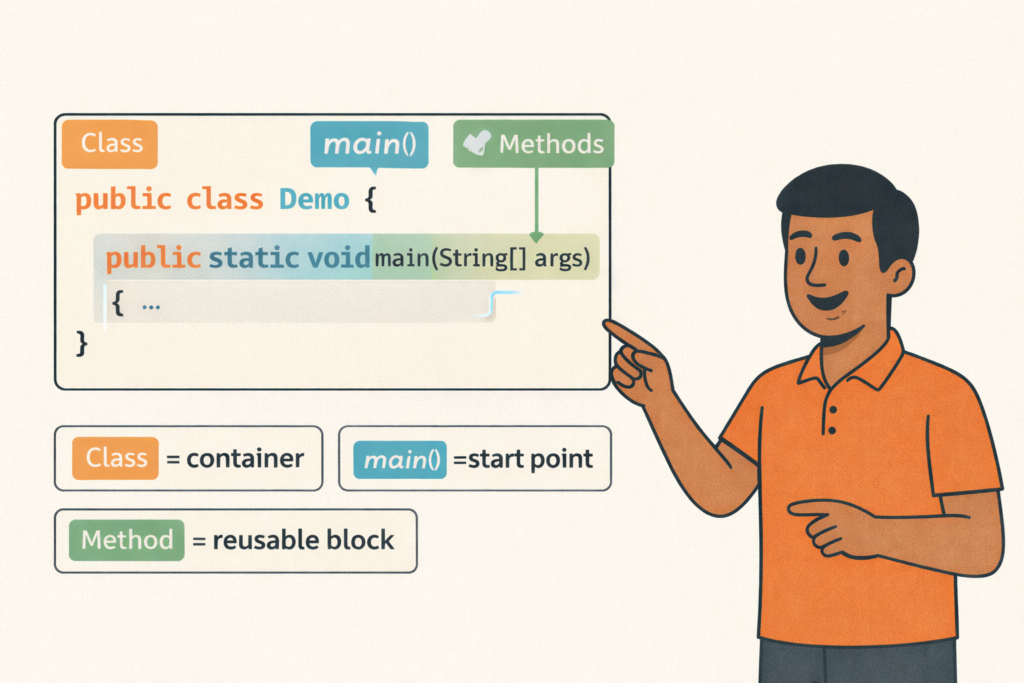
Core conceptA class is a blueprint or container that holds data (variables) and behavior (methods). Even if you don’t create objects now, you must understand that Java code is organized around classes.
Think of a class like a “toolbox”:
- The toolbox name is the class name.
- Tools inside are methods.
- Some tools can be used without creating a toolbox copy (static methods).
- Some tools require a toolbox object (non-static methods).
For now, focus on structure. In upcoming OOP lessons, we will go deep into classes and objects.
3) File Name Rule (Very Important)
Beginner ruleJava has a strict rule:
Correct:
// File name: HelloWorld.java
public class HelloWorld { }
Wrong:
// File name: Hello.java
public class HelloWorld { }
If you do it wrong, you’ll get this famous error: class HelloWorld is public, should be declared in a file named HelloWorld.java
You can have multiple classes in a single file, but only one can be public. As a beginner, keep it simple: one file = one public class.
4) What is main() Method?
Entry pointThe main() method is the starting point of a Java program. When you run a class using: java ClassName, JVM looks for a method with the exact signature:
public static void main(String[] args)If JVM cannot find it, your program will not start. That’s why main is called “entry point.”
You can write other methods and call them from main. This is the common pattern: main is your “controller” that calls other methods to perform tasks.
5) Breaking down: public static void main(String[] args)
Deep understandingLet’s break each word:
| Part | Meaning | Simple Explanation |
|---|---|---|
| public | Access modifier | JVM must be able to access main from anywhere |
| static | Belongs to class | JVM can call main without creating an object |
| void | No return value | Main doesn’t return data to JVM in normal usage |
| main | Method name | Fixed name JVM searches for |
| String[] args | Command-line arguments | Values passed from terminal when starting program |
Example of passing arguments:
// Run like this:
java HelloWorld Karthik Chennai

// args[0] = "Karthik"
// args[1] = "Chennai"
public class HelloWorld {
public static void main(String[] args) {
System.out.println("Name: " + args[0]);
System.out.println("City: " + args[1]);
}
}6) What is a Method in Java?
Reusable blocksA method is a reusable block of code that performs a specific task. Instead of writing the same logic again and again, we put it in a method and call it when needed.
General method structure:
accessModifier static/non-static returnType methodName(parameters) {
    // code
    return something; // only if returnType is not void
}
Example: a method to print a welcome message:
public static void welcome() {
    System.out.println("Welcome to Tamil Technicians Java Course!");
}
Now you can call this method from main:
public class Demo {
    public static void main(String[] args) {
        welcome();
    }

    public static void welcome() {
        System.out.println("Welcome to Tamil Technicians Java Course!");
    }
}7) Method Types: static vs non-static
ImportantAs a beginner, you will mostly write static methods first. Why? Because main is static, and static methods can be called easily without creating objects.
Static method (easy for beginners):
public class StaticExample {
    public static void main(String[] args) {
        sayHi(); // call directly
    }

    public static void sayHi() {
        System.out.println("Hi!");
    }
}
Non-static method (needs object):
public class NonStaticExample {
    public static void main(String[] args) {
        NonStaticExample obj = new NonStaticExample();
        obj.sayHi(); // call using object
    }

    public void sayHi() {
        System.out.println("Hi!");
    }
}8) Parameters & Return Values (Method Input/Output)
Functional thinkingMethods can take inputs (parameters) and can return outputs (return values). This is how we build clean and reusable logic.
Method with parameters (input):
public static void greet(String name) {
    System.out.println("Hello, " + name);
}
Method with return value (output):
public static int add(int a, int b) {
    return a + b;
}
Using them inside main:
public class MethodDemo {
    public static void main(String[] args) {
        greet("Karthik");

        int result = add(10, 20);
        System.out.println("Sum = " + result);
    }

    public static void greet(String name) {
        System.out.println("Hello, " + name);
    }

    public static int add(int a, int b) {
        return a + b;
    }
}9) Real Example Program (Simple Billing Style)
PracticalLet’s build a small “bill calculator” style program using methods. This teaches: program structure + calling methods + parameters + return.
import java.util.Scanner;

public class BillCalculator {

    public static void main(String[] args) {
        Scanner sc = new Scanner(System.in);

        System.out.print("Enter item price: ");
        double price = sc.nextDouble();

        System.out.print("Enter quantity: ");
        int qty = sc.nextInt();

        System.out.print("Enter GST percent (example 18): ");
        double gstPercent = sc.nextDouble();

        double subTotal = calculateSubTotal(price, qty);
        double gstAmount = calculateGST(subTotal, gstPercent);
        double total = subTotal + gstAmount;

        printBill(price, qty, subTotal, gstPercent, gstAmount, total);

        sc.close();
    }

    // Method 1: calculate subtotal
    public static double calculateSubTotal(double price, int qty) {
        return price * qty;
    }

    // Method 2: calculate GST amount
    public static double calculateGST(double subTotal, double gstPercent) {
        return subTotal * (gstPercent / 100.0);
    }

    // Method 3: print bill neatly
    public static void printBill(double price, int qty, double subTotal,
                                 double gstPercent, double gstAmount, double total) {
        System.out.println("\n------ BILL ------");
        System.out.println("Price   : " + price);
        System.out.println("Qty     : " + qty);
        System.out.println("SubTotal: " + subTotal);
        System.out.println("GST %   : " + gstPercent);
        System.out.println("GST Amt : " + gstAmount);
        System.out.println("Total   : " + total);
        System.out.println("------------------");
    }
}
Run this:
javac BillCalculator.java
java BillCalculator10) Common Beginner Mistakes (and Fix)
Fix fastMistake 1: File name and public class name mismatch
Fix: public class BillCalculator must be in BillCalculator.java
Mistake 2: Calling non-static method from static main
Fix: either make method static or create an object.
// Wrong (calling non-static from main)
public void test(){ }

public static void main(String[] args){
    test(); // ❌
}
// Fix 1: make it static
public static void test(){ }
// Fix 2: create object
ClassName obj = new ClassName();
obj.test();Mistake 3: Missing return in non-void method
Fix: If return type is int, you must return an int.
11) Practice Tasks (Do today)
Exercises- Create WelcomeApp.java with main and a method welcome().
- Create a method square(int n) that returns n*n. Print output in main.
- Create a method isAdult(int age) that returns true/false.
- Create a small program using 3 methods: input, compute, print.
- Try passing command line args and print them.
// Starter practice:
public class Practice {
    public static void main(String[] args) {
        System.out.println("Square of 7 = " + square(7));
        System.out.println("Adult? " + isAdult(18));
    }

    public static int square(int n) {
        return n * n;
    }

    public static boolean isAdult(int age) {
        return age >= 18;
    }
}Recommended Internal Links (SEO)
NavigationBuy link ;
Contact link ;
Java Program Structure (Class, main, Methods)– Full Beginner Explanation
Java Program Structure (Class, main, Methods) – Beginner Guide | Tamil Technicians TT Tamil Technicians…

Install JDK + VS Code/IntelliJ Setup+ Your First Java Program (Windows)
Install JDK + VS Code/IntelliJ Setup + First Java Program (Windows) | Tamil Technicians TT…
JDK vs JRE vs JVM – Easy Explanation(Compile & Run Flow for Beginners)
JDK vs JRE vs JVM – Easy Explanation (Beginner Guide) | Tamil Technicians TT Tamil…
Java Introduction & Where Java is Used(Apps, Web, Banking, Android)
Java Introduction & Where Java is Used (Apps, Web, Banking, Android) | Tamil Technicians TT…

