
Tamil Technicians – C Programming Course · Lesson 11
2D Arrays in C – Tables, Matrices & Small Mini-Projects
In the previous lesson, we learned 1D arrays in C and used them to store lists like marks, bills and readings. But many real-life data sets have both rows and columns:
- Marks of many students in many subjects (students × subjects).
- Daily readings taken at different times (days × time slots).
- Small images or grids (rows × columns of pixels).
- Electrical measurements at different points and different phases.
For these “table-shaped” data sets, we need 2D arrays, also called matrices. In this lesson, we will:
- Understand what 2D arrays are and how they are stored in memory.
- Learn their syntax and how to use nested loops to handle them.
- Build practical examples: marks tables, readings tables, multiplication tables.
- Do small mini-projects that feel close to real technician work.
- See common mistakes, best practices and FAQs.
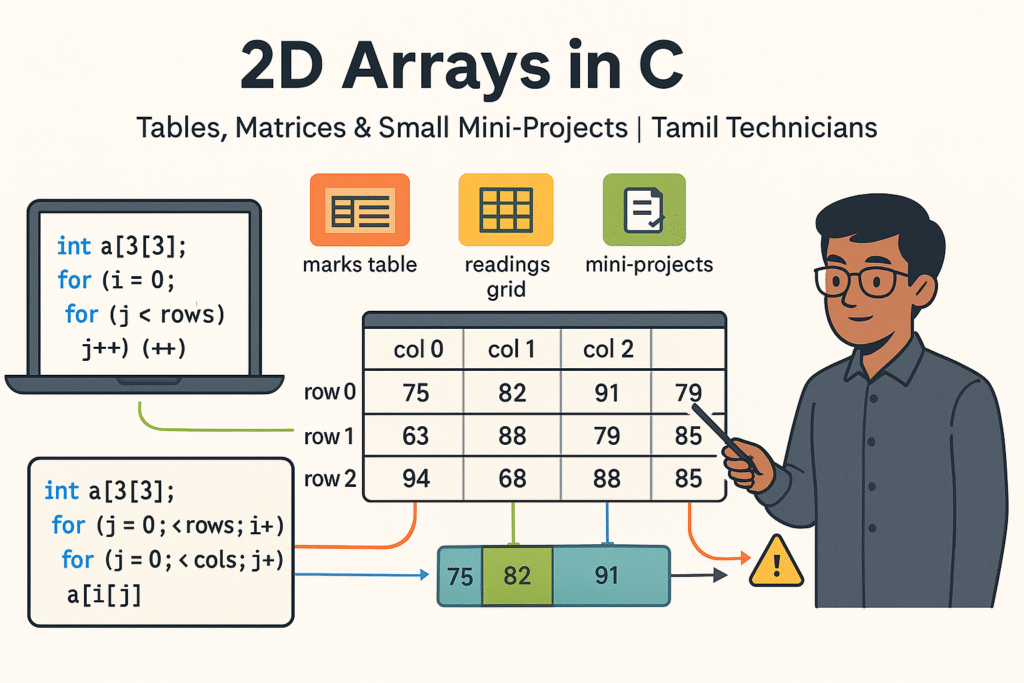
What Is a 2D Array in C?
A 2D array is like a table or matrix: it has rows and columns. Each element is identified by two indices:
- Row index – which row the element is in.
- Column index – which column in that row.
You can think of a 2D array as a table of boxes:
a[0][0]is first row, first column.a[1][2]is second row, third column.a[i][j]is element in rowi, columnj.
Think of an attendance register: rows are students, columns are days of a month. A 2D array can store that type of information perfectly.
Declaring 2D Arrays in C
Basic syntax:
data_type array_name[rows][cols];Examples
int marks[3][5];     // 3 students, 5 subjects each
float readings[7][4]; // 7 days, 4 readings per day
char grid[3][3];      // 3x3 grid (e.g., tic-tac-toe)
Both rows and cols must be
integer constant expressions (for classic C). In many modern compilers,
Variable Length Arrays (VLA) are allowed inside functions, but for now we will
think in terms of fixed sizes.
int a[3][4]; has:
- Row indices: 0, 1, 2
- Column indices: 0, 1, 2, 3
- Total elements: 3 × 4 = 12
Initializing 2D Arrays
You can initialize 2D arrays in multiple ways.
1. Row-wise Initialization
int a[2][3] = {
    {1, 2, 3},    // row 0
    {4, 5, 6}     // row 1
};
This represents the matrix:
1  2  3
4  5  6
2. Flattened Initialization (Row-Major)
int a[2][3] = {1, 2, 3, 4, 5, 6};Values fill row 0 first (3 elements), then row 1 (next 3 elements).
3. Partial Initialization
int a[2][3] = {
    {1, 2},   // becomes {1, 2, 0}
    {4}       // becomes {4, 0, 0}
};
Remaining elements are set to 0 automatically.
For teaching and debugging, initializing with curly braces per row is clearer. It matches how you imagine the table.
Nested Loops & 2D Array Traversal
To work with 2D arrays, we almost always use nested loops:
- Outer loop – iterates over rows.
- Inner loop – iterates over columns in each row.
General pattern
int i, j;
for (i = 0; i < rows; i++) {
    for (j = 0; j < cols; j++) {
        // use a[i][j]
    }
}
Example – Print a 3×3 Matrix
#include <stdio.h>

int main() {
    int a[3][3] = {
        {1, 2, 3},
        {4, 5, 6},
        {7, 8, 9}
    };
    int i, j;

    printf("Matrix:\\n");
    for (i = 0; i < 3; i++) {
        for (j = 0; j < 3; j++) {
            printf("%d ", a[i][j]);
        }
        printf("\\n");
    }

    return 0;
}i and j values:
(0,0), (0,1), (0,2), then (1,0), …
This will make nested loops natural and easy.
Mini-Project 1: Marks Table (Students × Subjects)
Let’s create a simple marks table program. We have M students and N subjects. We want to:
- Read all marks into a 2D array.
- Print the marks table nicely.
- Compute total and average for each student.
- Optionally, compute subject-wise averages.
#include <stdio.h>

#define MAX_STUDENTS 50
#define MAX_SUBJECTS 10

int main() {
    int m, n;        // m = students, n = subjects
    int marks[MAX_STUDENTS][MAX_SUBJECTS];
    int i, j;

    printf("Enter number of students: ");
    scanf("%d", &m);
    printf("Enter number of subjects: ");
    scanf("%d", &n);

    if (m <= 0 || m > MAX_STUDENTS || n <= 0 || n > MAX_SUBJECTS) {
        printf("Invalid size.\\n");
        return 0;
    }

    // Input marks
    for (i = 0; i < m; i++) {
        printf("\\nStudent %d:\\n", i + 1);
        for (j = 0; j < n; j++) {
            printf("  Enter mark for subject %d: ", j + 1);
            scanf("%d", &marks[i][j]);
        }
    }

    // Print table and student-wise totals
    printf("\\nMarks Table (rows = students, columns = subjects)\\n");
    for (i = 0; i < m; i++) {
        int total = 0;
        printf("Student %d: ", i + 1);
        for (j = 0; j < n; j++) {
            printf("%3d ", marks[i][j]);
            total += marks[i][j];
        }
        printf(" | Total = %3d, Average = %6.2f\\n", total, (float)total / n);
    }

    // Optional: subject-wise average
    printf("\\nSubject-wise average:\\n");
    for (j = 0; j < n; j++) {
        int sum = 0;
        for (i = 0; i < m; i++) {
            sum += marks[i][j];
        }
        printf("Subject %d average = %.2f\\n", j + 1, (float)sum / m);
    }

    return 0;
}
This program demonstrates a classic 2D array use case: a table of data, where we process it row-wise and column-wise.
Mini-Project 2: Daily Readings Table (Days × Time Slots)
Imagine a technician logging power or temperature readings at 4 time slots (morning, noon, evening, night) for 7 days. We can store this as a 7×4 table:
#include <stdio.h>

#define DAYS 7
#define SLOTS 4

int main() {
    float readings[DAYS][SLOTS];
    int day, slot;

    const char *slotNames[SLOTS] = {
        "Morning", "Noon", "Evening", "Night"
    };

    printf("Enter readings for %d days and %d time slots:\\n", DAYS, SLOTS);

    for (day = 0; day < DAYS; day++) {
        printf("\\nDay %d:\\n", day + 1);
        for (slot = 0; slot < SLOTS; slot++) {
            printf("  %s: ", slotNames[slot]);
            scanf("%f", &readings[day][slot]);
        }
    }

    // Print table
    printf("\\nReadings Table (rows = days, columns = slots)\\n");
    for (day = 0; day < DAYS; day++) {
        printf("Day %d: ", day + 1);
        for (slot = 0; slot < SLOTS; slot++) {
            printf("%8.2f ", readings[day][slot]);
        }
        printf("\\n");
    }

    // Daily averages
    printf("\\nDaily averages:\\n");
    for (day = 0; day < DAYS; day++) {
        float sum = 0.0f;
        for (slot = 0; slot < SLOTS; slot++) {
            sum += readings[day][slot];
        }
        printf("Day %d average = %.2f\\n", day + 1, sum / SLOTS);
    }

    return 0;
}Mini-Project 3: Multiplication Table Using 2D Array
Let’s create a multiplication table (times table) using a 2D array. For example, 1 to 10 rows and 1 to 10 columns.
#include <stdio.h>

#define SIZE 10

int main() {
    int table[SIZE][SIZE];
    int i, j;

    // Fill the table
    for (i = 0; i < SIZE; i++) {
        for (j = 0; j < SIZE; j++) {
            table[i][j] = (i + 1) * (j + 1);
        }
    }

    // Print header row
    printf("    ");
    for (j = 1; j <= SIZE; j++) {
        printf("%4d", j);
    }
    printf("\\n");

    // Separator
    printf("    ");
    for (j = 1; j <= SIZE; j++) {
        printf("----");
    }
    printf("\\n");

    // Print table with row labels
    for (i = 0; i < SIZE; i++) {
        printf("%3d|", i + 1);
        for (j = 0; j < SIZE; j++) {
            printf("%4d", table[i][j]);
        }
        printf("\\n");
    }

    return 0;
}
This mini-project shows how 2D arrays model a mathematical table and how nested loops generate and print it neatly.
Matrix Operations (Addition & Transpose)
2D arrays are often called matrices because they support mathematical operations like addition, subtraction, transpose and multiplication. For beginners, addition and transpose are a good starting point.
Matrix Addition (Same Size)
We add two matrices A and B to get C, where:
C[i][j] = A[i][j] + B[i][j]
#include <stdio.h>

#define R 2
#define C 3

int main() {
    int A[R][C] = {{1, 2, 3}, {4, 5, 6}};
    int B[R][C] = {{10, 20, 30}, {40, 50, 60}};
    int sum[R][C];
    int i, j;

    for (i = 0; i < R; i++) {
        for (j = 0; j < C; j++) {
            sum[i][j] = A[i][j] + B[i][j];
        }
    }

    printf("Sum matrix:\\n");
    for (i = 0; i < R; i++) {
        for (j = 0; j < C; j++) {
            printf("%4d", sum[i][j]);
        }
        printf("\\n");
    }

    return 0;
}
Matrix Transpose
The transpose of an R × C matrix is a C × R matrix
where rows and columns are swapped:
transpose[j][i] = A[i][j].
#include <stdio.h>

#define R 2
#define C 3

int main() {
    int A[R][C] = {{1, 2, 3}, {4, 5, 6}};
    int T[C][R];  // transposed dimensions
    int i, j;

    for (i = 0; i < R; i++) {
        for (j = 0; j < C; j++) {
            T[j][i] = A[i][j];
        }
    }

    printf("Transpose:\\n");
    for (i = 0; i < C; i++) {
        for (j = 0; j < R; j++) {
            printf("%4d", T[i][j]);
        }
        printf("\\n");
    }

    return 0;
}Mini-Project 4: Simple Tic-Tac-Toe Board (Representation Only)
As a fun example, let’s use a 2D array to represent a 3×3 tic-tac-toe board. We won’t build the full game engine here, but we will:
- Store the board using a 2D array of chars.
- Fill some positions with
'X'and'O'. - Print the board in a nice format.
#include <stdio.h>

int main() {
    char board[3][3];
    int row, col;

    // Initialize all cells with space
    for (row = 0; row < 3; row++) {
        for (col = 0; col < 3; col++) {
            board[row][col] = ' ';
        }
    }

    // Sample moves
    board[0][0] = 'X';
    board[1][1] = 'O';
    board[0][2] = 'X';
    board[2][2] = 'O';

    // Print board
    printf("\\nTic-Tac-Toe Board:\\n");
    for (row = 0; row < 3; row++) {
        printf(" %c | %c | %c \\n", board[row][0], board[row][1], board[row][2]);
        if (row < 2) {
            printf("---+---+---\\n");
        }
    }

    return 0;
}
This example shows how 2D arrays are perfect for grid-like structures such as games, seating charts, or floor maps.
How 2D Arrays Are Stored in Memory (Row-Major)
Internally, C stores 2D arrays in a contiguous block of memory. They are laid out in row-major order:
- Elements of row 0 come first (all columns),
- then elements of row 1,
- then row 2, and so on.
For example, for int a[2][3] = {{1,2,3},{4,5,6}};,
memory layout (conceptually) is:
1 2 3 4 5 6- Pass 2D arrays to functions.
- Optimize code for performance.
- Work with pointers and dynamic memory.
Passing 2D Arrays to Functions (Basic Idea)
You can pass a 2D array to a function by specifying the number of columns. Example: function to print a matrix with R rows and C columns.
void printMatrix(int rows, int cols, int a[rows][cols]) {
    int i, j;
    for (i = 0; i < rows; i++) {
        for (j = 0; j < cols; j++) {
            printf("%4d", a[i][j]);
        }
        printf("\\n");
    }
}
In classic C90, you usually write int a[][C] with fixed C.
Modern C standards (C99 and later) allow Variable Length Arrays (VLA) as above.
For beginner-level learning, it is enough to know that:
- 2D arrays can be passed to functions.
- The function must know the number of columns.
Common Mistakes with 2D Arrays
-
Swapping indices:
Using
a[col][row]instead ofa[row][col]. -
Wrong loop bounds:
Using
i <= rowsorj <= colsinstead of<. - Mismatched dimensions: Doing matrix addition with different-sized matrices.
- Not initializing all elements: Forgetting to fill the entire table before using it.
- Confusion with row/column meaning: Not clearly deciding what rows and columns represent.
int a[3][4];
int i, j;

for (i = 0; i <= 3; i++) {     // WRONG: should be i < 3
    for (j = 0; j <= 4; j++) { // WRONG: should be j < 4
        a[i][j] = i + j;
    }
}<= instead of < here will write to invalid locations
like a[3][something] and a[something][4].
Bugs like this can cause crashes or strange behavior.
2D Array Checklist
- Have you clearly defined what rows and columns represent?
- Are your loops using
0 ... rows-1and0 ... cols-1correctly? - Did you initialize all rows and columns correctly?
- In nested loops, are you using different variables (e.g.,
ifor rows andjfor cols)? - For matrix operations, are the dimensions compatible?
Practice Problems – Tables, Matrices & Mini-Projects
- Marks Table Plus Grade: Extend the marks table mini-project. For each student, calculate percentage and assign a grade (A/B/C/D/F) based on percentage.
- Temperature Grid: Store temperatures for 7 days and 3 times per day (morning, noon, night). Find the hottest and coldest time across the week.
- Matrix Subtraction: Read two 3×3 matrices from the user and print their difference.
- Matrix Diagonal Sum: For a square matrix (n×n), calculate the sum of the main diagonal elements.
- Row & Column Totals: For a 3×3 matrix, print row sums and column sums (like a mini spreadsheet).
- Seat Layout Mini-Project: Represent a small bus or classroom seating using a 2D array of chars (e.g., ‘A’ for available, ‘B’ for booked). Let the user book a few seats and then print the updated layout.
Suggested Featured Image Prompt
Use this prompt in your AI image generator for the thumbnail:
“Flat modern 16:9 illustration on a light background. In the center, a grid of boxes represents a 2D array (matrix) with rows and columns, labeled along the top as `col 0`, `col 1`, `col 2` and along the left side as `row 0`, `row 1`, `row 2`. Inside the boxes are sample numbers like 75, 82, 91 as marks or readings. Above the grid, small icons show ‘marks table’, ‘readings grid’ and ‘mini-projects’. On the left, a laptop screen displays C code with `int a[3][3];` and nested `for (i = 0; i < rows; i++)` / `for (j = 0; j < cols; j++)` loops, with `a[i][j]` highlighted. On the right, a South Indian / Tamil technician character points to one cell of the matrix with a pointer. At the top, bold title text: ‘2D Arrays in C’ and smaller subtitle: ‘Tables, Matrices & Small Mini-Projects | Tamil Technicians’. Clean vector style, minimal colors, educational and high quality.”
FAQ: 2D Arrays in C
1. Is a 2D array just an array of arrays?
Conceptually, yes. You can think of int a[3][4]; as an array of 3 elements,
where each element is itself an array of 4 integers. Internally, it is stored as one
contiguous block of memory in row-major order.
2. Can I use variable sizes for 2D arrays?
Inside functions, many modern C compilers support Variable Length Arrays (VLA), allowing
int a[rows][cols]; where rows and cols are runtime values.
However, in classic C and for maximum portability, 2D array dimensions are usually constants.
3. Are 2D arrays slower than 1D arrays?
They are built on top of the same memory model. Accessing a[i][j] is very similar
to accessing a 1D array element; the compiler calculates the address using row and column.
For typical learning and small programs, performance differences are not a concern.
4. When should I use a 2D array instead of multiple 1D arrays?
Use a 2D array when your data naturally forms a table (rows × columns) and you want to treat it consistently in loops. Multiple 1D arrays can work, but 2D arrays make relationships between rows and columns clearer and easier to maintain.

